Root App overview
A Root App (App) is a full-featured software application that brings new functionality to a Root community. As a developer, you build Root Apps and publish them in the Root Store. Community administrators install Apps from the Store into their communities. Each App runs inside its own channel, and members can jump in anytime to interact with it.
Analogy
Before we get into the details of Root, let's think about how you'd build a chat app for a mobile platform. This will give some intuition that'll help with Root Apps. Conceptually, the deployment would look something like this:
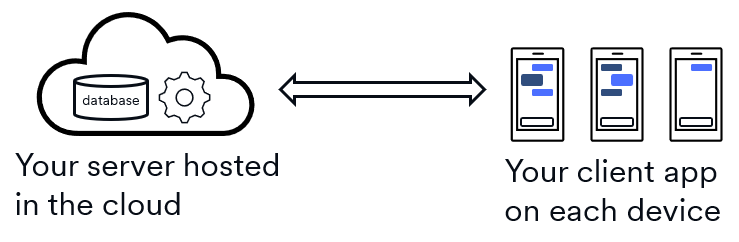
To implement this architecture, you'd need a mobile app that lets users read and write messages. It'd have a message editor that supports text, emoji, etc. Users can send messages to a single other person or a group. The app listens for new messages and displays them immediately. You need to build this entire experience: the editor, the list of messages, and the logic to listen for incoming messages. Every user will install your mobile app on their device.
Next, you'll need some infrastructure to coordinate everything. These type of apps typically run with a single, central server. The server gets all the messages from all the client apps and forwards them to the recipients. If a message goes to a group, the server does a broadcast where it sends the same message to multiple recipients. The server usually stores the messages in a database in case some recipients aren't online so it can send the message later. It's your job to write all this server code. You're also responsible for setting up a computer somewhere to run your code; it's common to pay a cloud computing provider to host your server and database.
The last thing you need to do is define what the clients and server send to each other. Going from the client to the server, you'll likely send the message text, the sender's identity, and the list of recipients. When the server forwards the message to each recipient, it'll need to include the message text and the sender's identity. It's also your job to define this data flow.
In summary, here are the things you need to do:
- Client: Build your mobile app with a graphical user interface (GUI).
- Server: Code your server, set up a database for persistent storage, arrange for a host.
- Networking: Define the data flow between your clients and server.
Root Apps have these same three components with some nice simplifications: Root gives you the database, hosts your server, and implements most of your networking.
How Root Apps work
Root Apps follow a client-server model, which means they have three main parts:
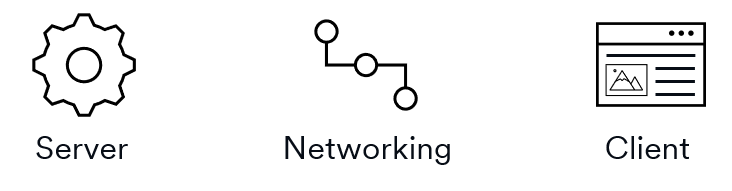
- Client: Your GUI that members use to interact with the App.
- Server: Your backend that handles business logic and data storage.
- Networking: Your messages between the client and server.
When you build a Root App, you’ll code all three of these components.
Client
The client of a Root App is a full GUI written in TypeScript using web tech. The client runs inside a browser-like container where it has access to most browser functionality except for native resources (i.e., you won't be able to access the file system, webcam, audio hardware, etc.).
You can choose your preferred UI framework like React, Angular, Vue, etc. You can also pull in third-party packages from registries like npm.
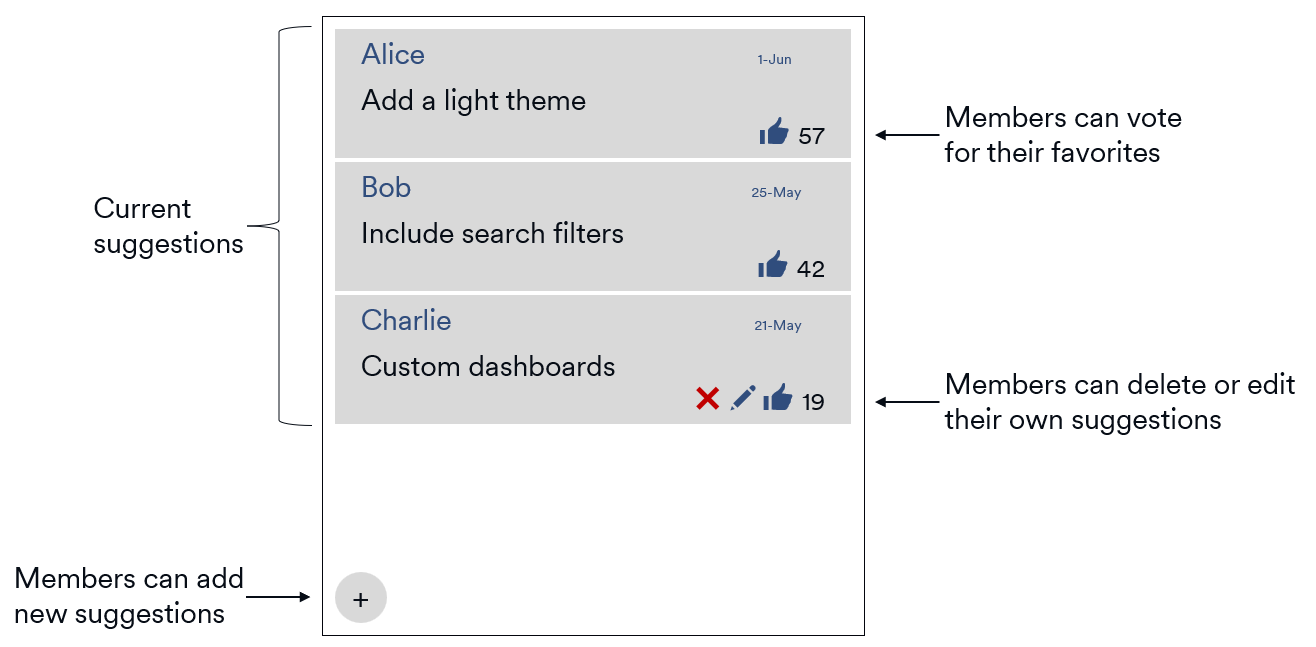
Consider a SuggestionBox Root App that lets community members make suggestions about how their community is run. Members can add new suggestions or vote on existing suggestions. The following image shows a mockup of the SuggestionBox client interface.
Server
The server of a Root App is written in TypeScript and runs inside Node. You'll have access to most core Node.js modules (with some security limitations). You can also pull in third-party packages from registries like npm.
Root Apps use SQLite for persistent data storage on the server side. It's all set up for you; Root even tracks your App’s data file and provides automatic backup/restore. You can pull in the standard SQLite API sqlite3 to access your database, or you can add a third-party ORM like sequelize.
In the SuggestionBox example, the server would likely create two tables inside SQLite: suggestions and votes. The business logic would then track all active suggestions, record votes, prevent double-voting, etc.
Networking
The networking layer of a Root App is written in Protobuf. Root tooling processes the Protobuf and generates client-side and server-side code.
For example, SuggestionBox needs to support the create operation for new suggestions. First, you'd define message types like SuggestionCreateRequest and SuggestionCreateResponse. These messages will become the data-transfer objects that you send across the network between your client and your server.
//
// Your client creates one of these to send to the server.
//
message SuggestionCreateRequest {
  string text = 1;
}

//
// Your server creates one of these, fills in the fields like id and timestamp,
// sends it back to the calling client, and broadcasts it to the other clients.
//
message SuggestionCreateResponse {
  uint32 id                         = 1;
  string author_id                  = 2;
  string text                       = 3;
  repeated string voter_ids         = 4;
  rootsdk.Timestamp created_at = 5;
}
You'd create a service that defines your remote procedure call (RPC) interface.
service SuggestionService {
  //
  // This one declaration will yield two methods: one on your client side and one on your server.
  //   - The client method will be fully implemented.
  //   - The server version will be a stub that you'll need to code to add your business logic.
  //
  rpc Create(SuggestionCreateRequest) returns (SuggestionCreateResponse);

  // ...
}
The Root tooling processes the Protobuf and writes a lot of TypeScript for you. For now, the key thing to note is that the Root tooling generates all the under-the-hood networking code. You simply call the generated methods and don't worry about opening connections, sending authorization codes, or serializing/deserializing data.
App installation
Let's use SuggestionBox to show what happens to a Root App during installation. We'll use a graphic of a box to denote the SuggestionBox code:

When a community member with the Manage Apps permission installs an App into their community, two things happen:
- Client – The installation tooling pushes the App's client to every community members' device.
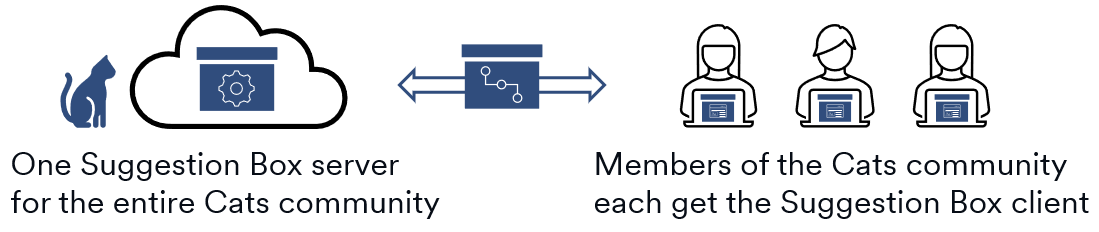
- Server – The Root infrastructure creates a single instance of the App's server running inside the Root cloud.
Here's what the situation would look like after a Cats community installed the SuggestionBox App:
If a Dogs community installed SuggestionBox, they'd get their own instance of the SuggestionBox server:
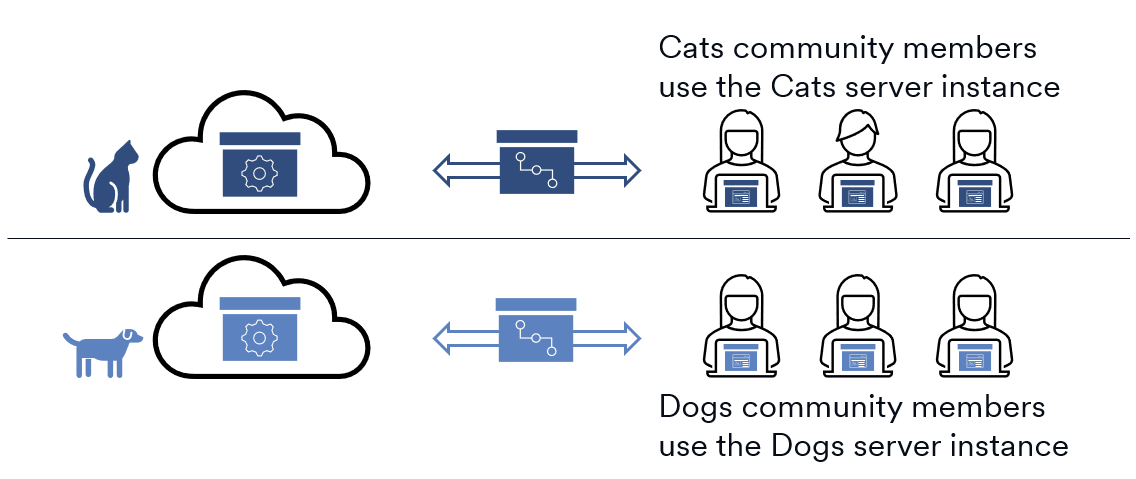
Since each community gets their own instance of an App's server, each community has their own SQLite database. For example, when SuggestionBox is installed into both the Cats and Dogs communities, each community would have their suggestions stored in a separate database.
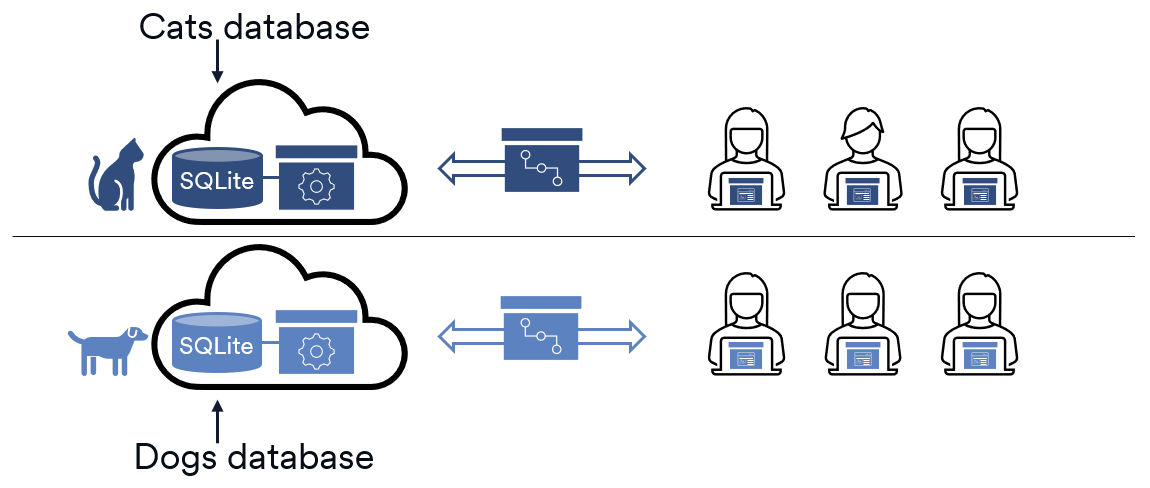
App execution
Root Apps run in a containerized environment, with distinct execution models for the client and server. The key thing to notice is that Root hosts both your client and server for you.
- Client: Runs inside the Root native client, hosted in a Chromium-like environment.
- Server: Runs in the Root cloud using Node. The Root infrastructure provisions one server instance per community.
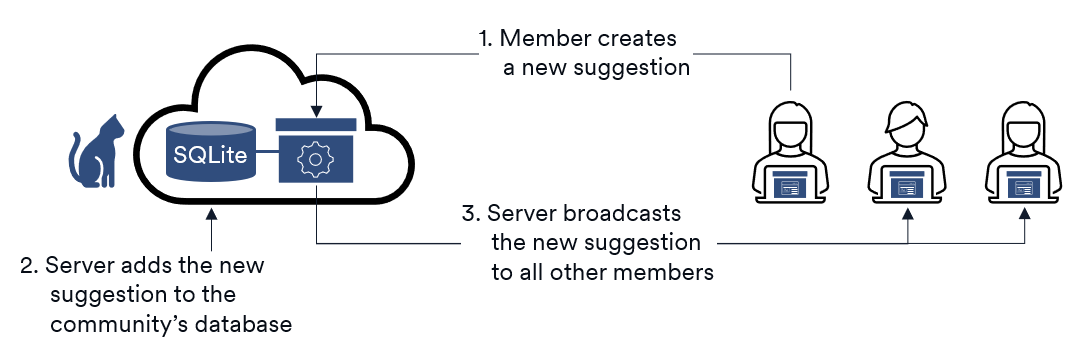
Having one server per community helps an App keep all its clients up-to-date. A common interaction pattern is an operation initiated on the client and processed by the server:
- When a member interacts with the App, the client sends a request to the server.
- The server processes the request, typically by updating its SQLite database.
- The server broadcasts the change to the relevant clients so they can update their UI.
For example, the SuggestionBox App would see this pattern when a member creates a new suggestion.
The Root SDK
The API and tools we discussed here are all part of the Root SDK. It comes with everything you need to develop and run your App:
- Build tools: Generates much of the networking code for your client-server interactions.
- Testing tools: Lets you run and test your App locally before deploying.
- App API: A TypeScript library of Root types for your App to use in both its client and server. It provides things like a job scheduler, persistent key-value store, and exception types. It even lets your App interact with its community programmatically:
- Create a message in a channel.
- Upload a file to a channel.
- Receive an event when a new member joins the community.
- Receive an event when a message is posted to a channel.
- Etc.
You'll include the SDK in your project's dependencies so it'll get installed on your development machine.