Generate a service
This article covers how to use the Root tooling to generate your App's networking code from your protobuf definition.
What is service generation?
Service generation is a step in your build process where the Root tooling generates networking code from your protobuf. The tooling generates all the plumbing code needed to make remote-procedure calls: object serialization/deserialization code, addressing, authentication, etc.
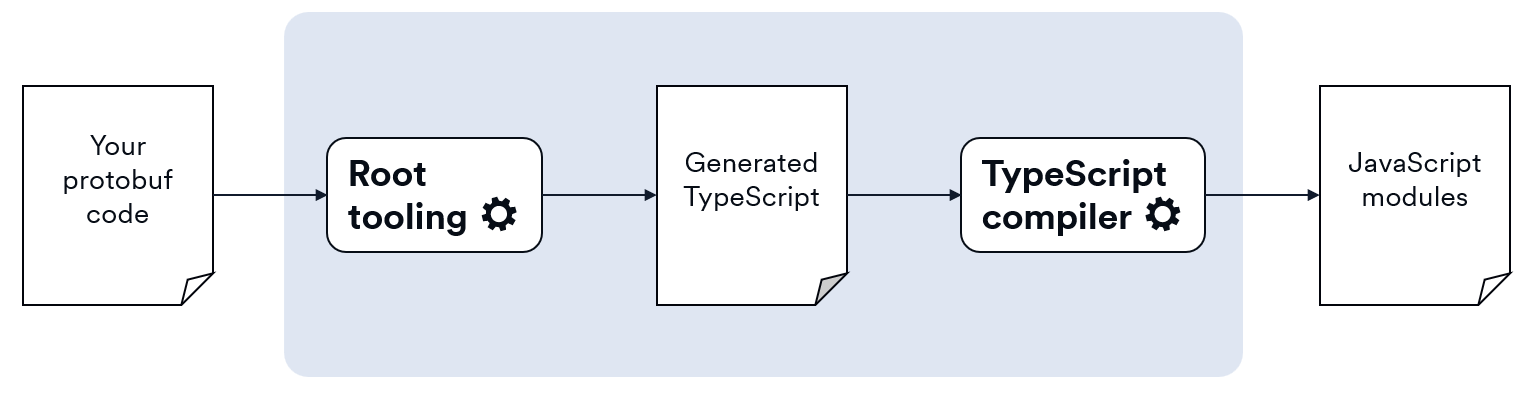
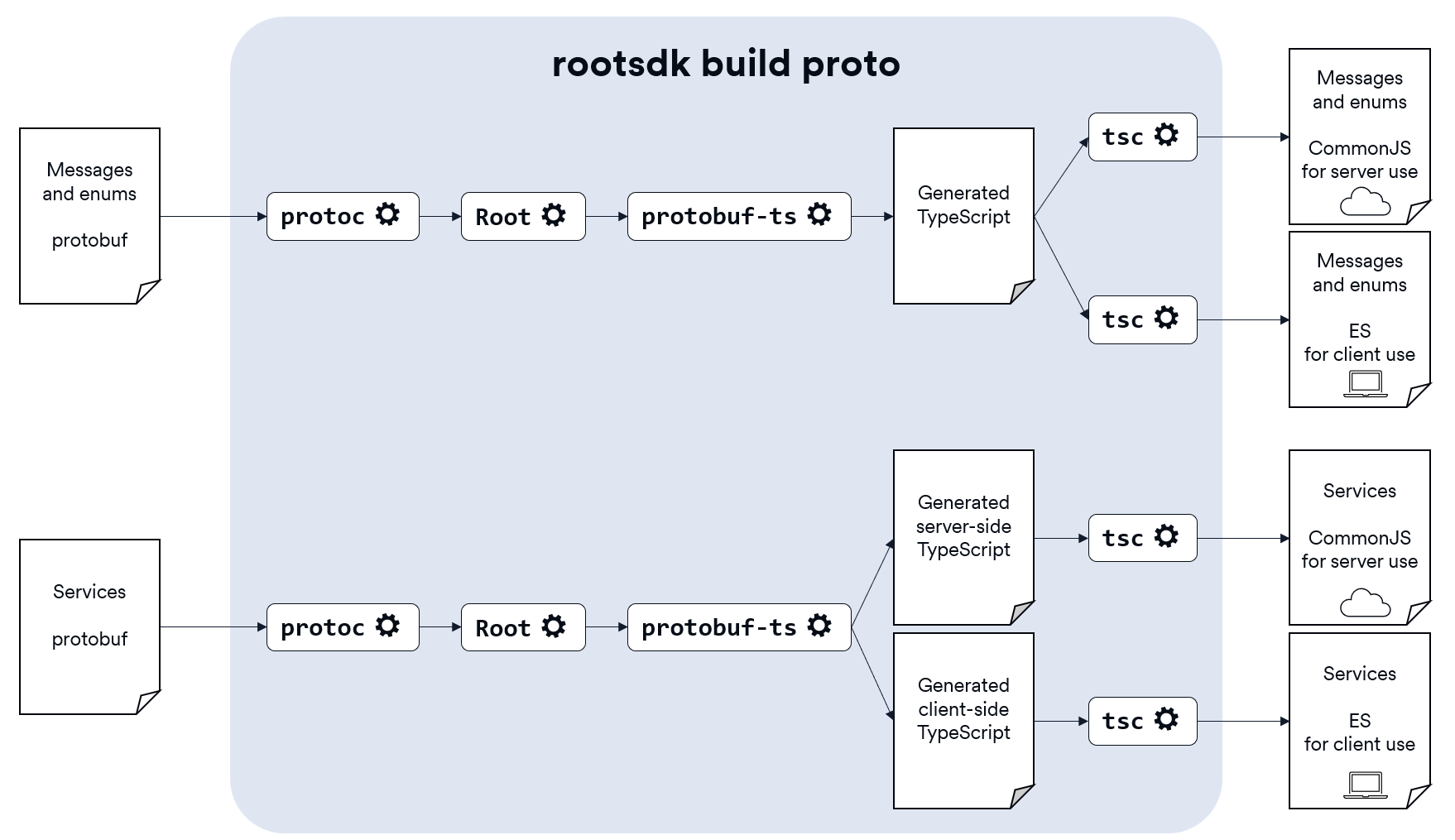
There are two steps to the process: first Root generates a full TypeScript implementation of your networking layer, and then the tooling runs the TypeScript compiler (tsc) over the generated TypeScript so it's fully ready for you to use. The following diagram shows a simplified view of the process; we'll see more details as we work through the cases.
Root App JavaScript module types
Root Apps use CommonJS modules on the server and ES modules on the client because each works best for its environment.
-
Server: Root App servers run in a Node.js environment, where CommonJS is widely supported and compatible with many existing libraries. It's the traditional module system for server-side code.
-
Client: Root App clients use modern build tools and run in a browser-like environment, which expects ES modules. ES modules are the standard for writing modular, browser-friendly JavaScript—especially in frameworks like React.
When Root generates JavaScript for you, it runs the TypeScript compiler multiple times to create CommonJS modules for use on your server and ES modules for your client.
Message and enum generation
The Root tooling processes your protobuf messages into data-transfer objects (DTOs) that are used in both your App's server and client. Enums are handled just like messages; they're used as field types inside messages so they're also required on both sides of the network connection.
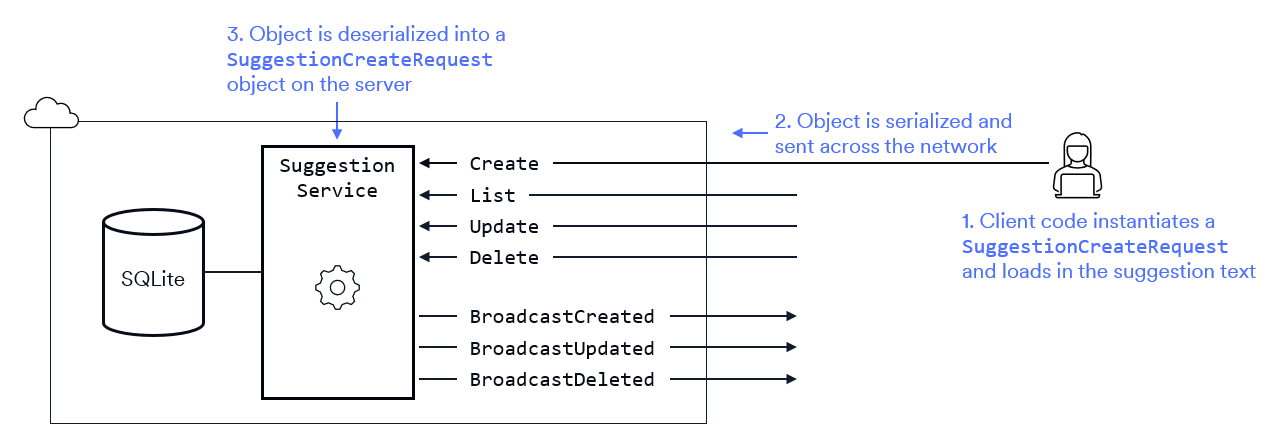
For example, when the client needs to create a new suggestion in SuggestionBox, the client creates a SuggestionCreateRequest object and sends it to the server. This means that DTOs like SuggestionCreateRequest need to be available in both your client and server code.
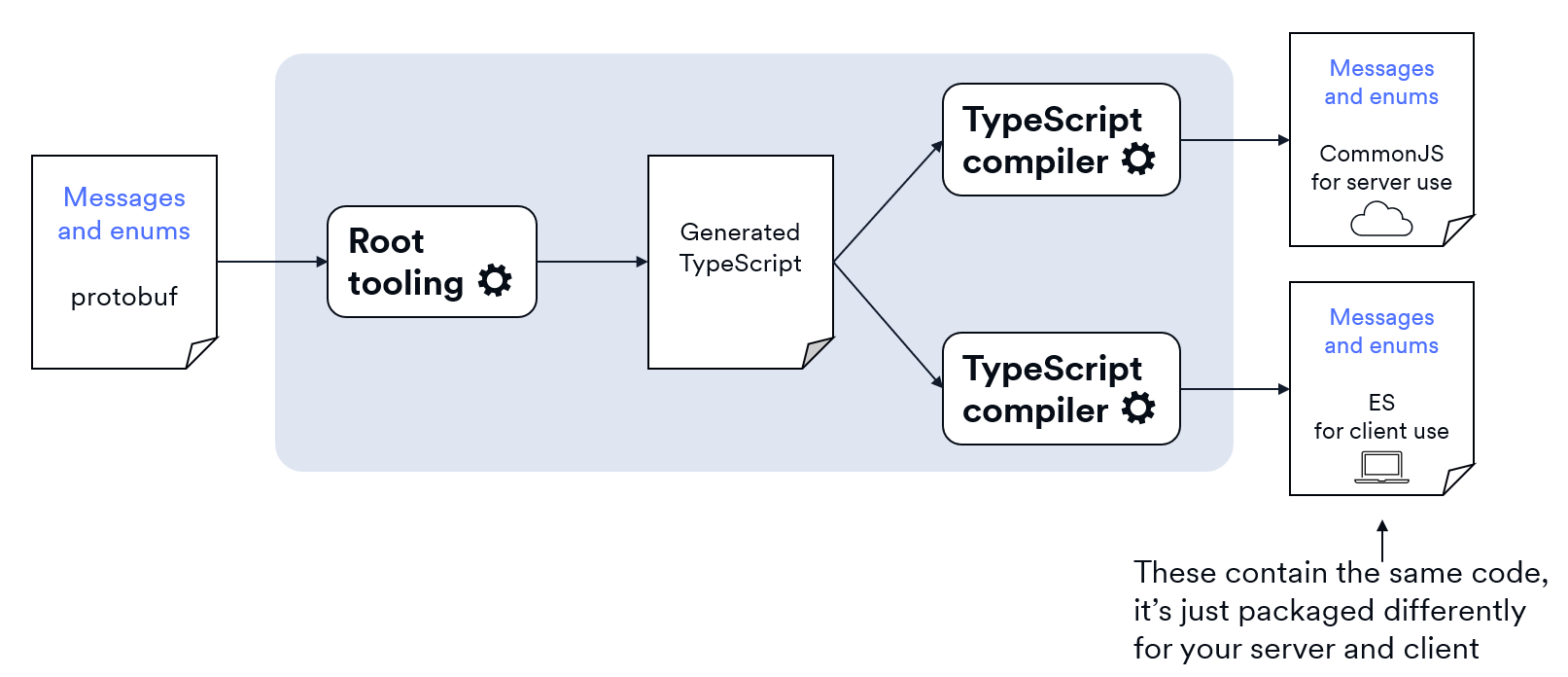
To support use on both the server and the client, the Root tooling generates two JavaScript modules for you: a CommonJS module for your server and an ES module for your client. These modules contain the same code (your message types) packaged appropriately for the two sides of your App.
Message translation
The Root tooling generates a TypeScript interface for each of your protobuf message types. The generated TypeScript uses TypeScript types and follows TypeScript naming conventions. Here's the conversion table for the protobuf scalar value types into TypeScript types:
| Protobuf type | TypeScript equivalent |
|---|---|
int32 | number |
int64 | bigint |
uint32 | number |
uint64 | bigint |
sint32 | number |
sint64 | bigint |
fixed32 | number |
fixed64 | bigint |
sfixed32 | number |
sfixed64 | bigint |
bool | boolean |
float | number |
double | number |
string | string |
bytes | Uint8Array |
For example, the Suggestion type from SuggestionBox looks like this in protobuf:
message Suggestion {
  uint32 id                         = 1;
  string author_id                  = 2;
  string text                       = 3;
  repeated string voter_ids         = 4;
  rootsdk.Timestamp created_at = 5;
}
In the generated TypeScript, the types have been changed into TypeScript types and the field names now follow TypeScript conventions. All message-type fields like Timestamp automatically yield optional properties in the TypeScript; if you want a scalar-type field like uint32 to be optional, you can add the optional specifier to the protobuf field.
export interface Suggestion {
  id: number;
  authorId: string;
  text: string;
  voterIds: string[];
  createdAt?: Timestamp;
}
Enum translation
Protobuf enums are translated into TypeScript enums.
enum Category {
  CATEGORY_UNKNOWN     = 0;
  CATEGORY_ENGINEERING = 1;
  CATEGORY_BILLING     = 2;
  CATEGORY_MARKETING   = 3;
}
In the generated TypeScript, the prefixing is removed from the value names to follow TypeScript conventions.
export enum Category {
  UNKNOWN     = 0,
  ENGINEERING = 1,
  BILLING     = 2,
  MARKETING   = 3
}
Service generation
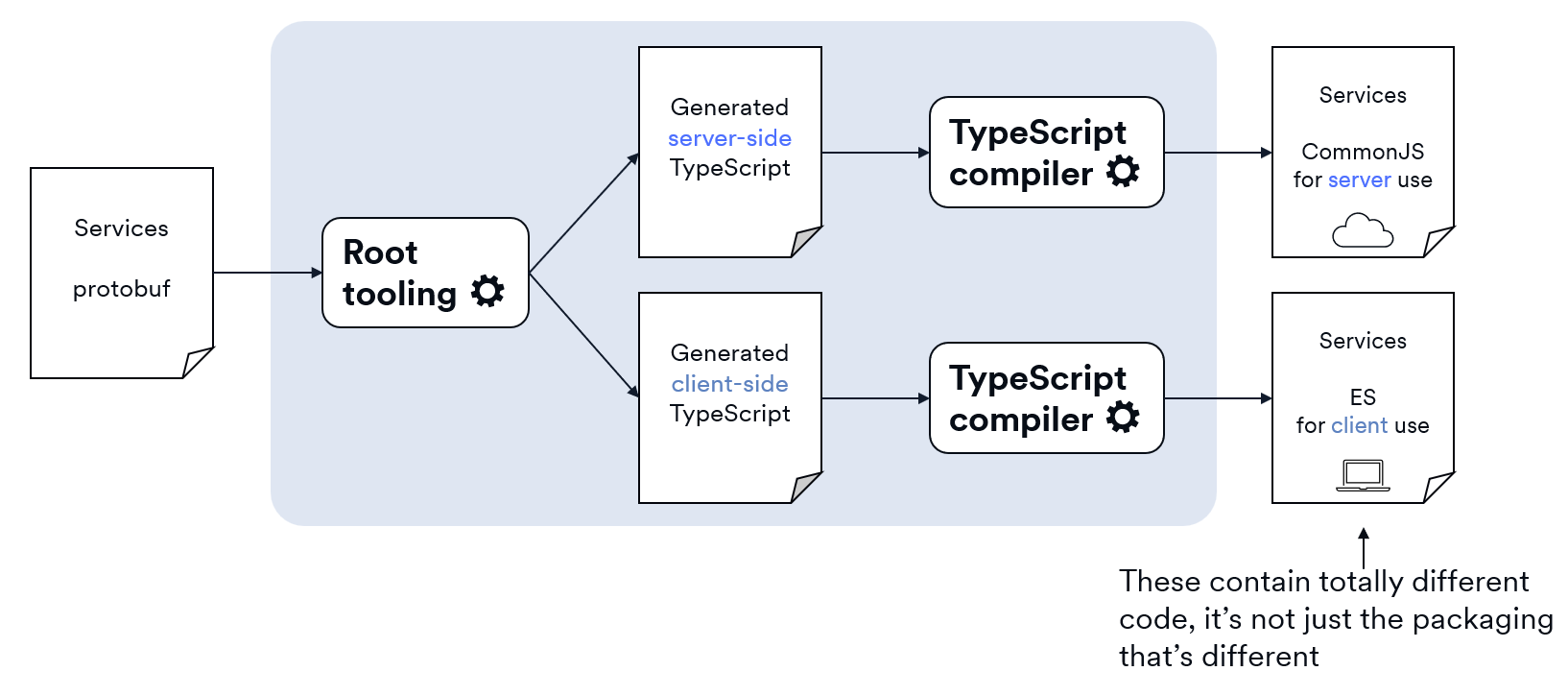
Root processes each of your protobuf services to generate server-side and client-side code for you. The code it generates on the two sides is very different:
- Server-side: A base class with partial functionality. The code is incomplete; you'll need to finish it by extending the class and adding your business logic.
- Client-side: A class with fully implemented methods and events. It's ready to use; there's nothing you need to add.
The Root tooling generates a CommonJS module for your server and an ES module for your client. The two JavaScript modules will not only be packaged in different formats, they'll also contain very different code since the generated TypeScript for the server and client is different.
Project structure
Root Apps have three main folders:
-
server/The backend, built with Node.js. It runs the app logic, keeps track of state, and handles messages from clients. -
client/The frontend, which runs in a browser-like environment. It shows the user interface and talks to the server using protobuf messages. -
networking/Protobuf definitions. This folder has the.protofiles and the generated TypeScript/JavaScript code used by both the server and client to send and receive messages.
By convention, each folder has a nested src folder containing the souce code for that category.
In the remainder of this article, we'll discuss how to configure and run the root tooling over the protobuf code in your networking folder.
What is rootsdk build proto?
rootsdk build proto is Root's custom protobuf translator tool that's part of the Root SDK. It orchestrates the conversion of your protobuf into JavaScript modules that contain your App's networking API.
There's a lot of Root custom code inside rootsdk build proto. It also makes use of the protobuf compiler (protoc), a TypeScript plugin (protobuf-ts), and the TypeScript compiler (tsc). Here's a detailed view of the translation process.
rootsdk build proto configuration
rootsdk build proto has several options that let you control its code generation. At a minimum, you need to tell it your input .proto files and your App's scope. Your scope is the prefix you use in your package names to group your packages under a namespace: @scope/package-name (e.g., @suggestionbox/server).
Your options go in a configuration file named root-protoc.json. The file needs to be in the location where you'll run rootsdk build proto; typically, this means in your networking folder.
For example, here's a simplified view of the networking folder structure for the SuggestionBox App:
At a minimum, the config file would need to look like this:
{
  "source": ["./src/suggestion.proto", "./src/vote.proto"],
  "scope": "@suggestionbox"
}
The source element supports wildcard (*) and globbing (**) so you could use the following to match all .proto files under the current location.
{
  "source": ["./**/*.proto"],
  "scope": "@suggestionbox"
}
rootsdk build proto options
Here's the list of available rootsdk build proto options.
| Field | Description | Default | Required? |
|---|---|---|---|
source | An array of glob patterns pointing to .proto files to compile. | Root types only | No |
protoPaths | Directories to search for imported .proto files. | ./src | No |
outDir | Root folder where generated packages are written. | ./gen | No |
scope | The NPM package scope (e.g., @myapp) used when naming packages. | - | Yes |
clientPackageName | The package name (without scope) for generated client code. | gen-client | No |
serverPackageName | The package name (without scope) for generated server code. | gen-server | No |
sharedPackageName | The package name (without scope) for shared definitions and types. | gen-shared | No |
{
  "source": ["./**/*.proto"],
  "protoPaths": ["./src"],
  "outDir": "./gen",
  "scope": "@suggestionbox",
  "clientPackageName": "gen-client",
  "serverPackageName": "gen-server",
  "sharedPackageName": "gen-shared"
}
Given the above configuration, running the generator would produce the structure shown in the following diagram. Note that you can control the name of the output folder (gen in this case), but you cannot change the names of the client, server, and shared subfolders.
How to import generated code
The import locations for the generated code are formed from the scope and package names you put in your root-protoc.json file.
| Scope | Package name | Example import |
|---|---|---|
@suggestionbox | gen-client | import { ... } from "@suggestionbox/gen-client" |
@suggestionbox | gen-server | import { ... } from "@suggestionbox/gen-server" |
@suggestionbox | gen-shared | import { ... } from "@suggestionbox/gen-shared" |
Conclusion
Service generation with Root automates the boilerplate parts of networking. By defining your protobuf files and running rootsdk build proto, you get ready-to-use TypeScript code for your client and server—no manual wiring required.